
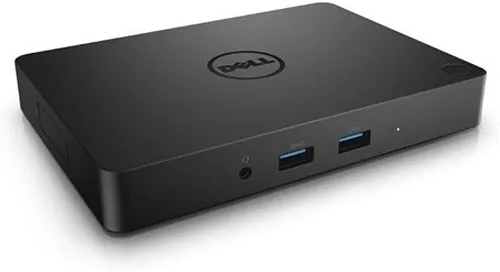
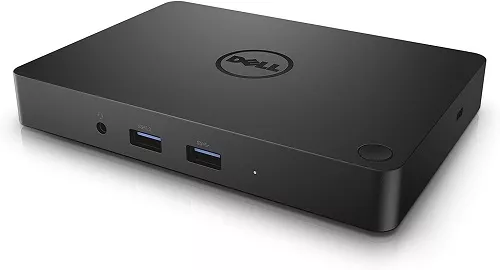


Connecting multiple peripherals to your notebook can be a bit messy and cause discomfort. With the new dock from Dell, you can now convert your notebooks and tablets into a desktop with just a single data and power source up to 130W for Dell Products.
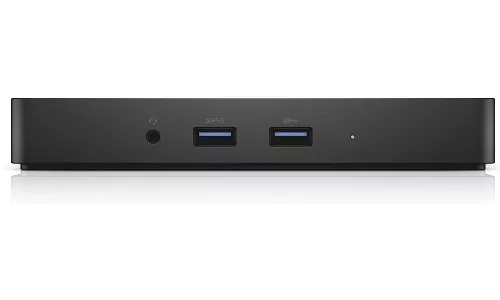
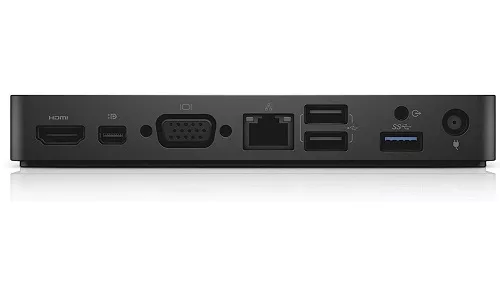
Dell WD15 is built with one mini DisplayPort, one HDMI port and one VGA port that enable you to visualise your notebook screen into an external display screen. It is also built with input and output ports that enable you to connect both wired and wireless gadgets and other peripherals including mouse, keyboards, headset, and many others. Additionally, connect peripherals via USB 3.0, USB 3.0 PowerShare, USB 2.0, 7.4 mm DC-in, Gigabit Ethernet (RJ–45), Global headset jack, and Line-out connector.
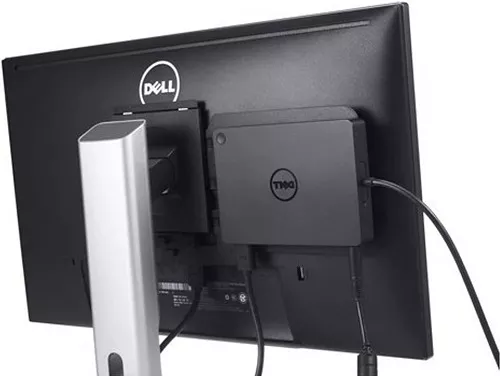
The Dell WD15 provides one common docking solution across Dell notebooks and non-Dell notebooks, such as Lenovo, Apple, HP, and many other platforms that support USB-C connection. It is designed simply to blend into your workspace without taking too much space. With a dimension of just 6.1 x 4.3 x .83 inches (15.49 x 10.92 x 2.11 cm), you can place the Dell WD15 anywhere on your workstation. However, if you like to deploy a more professional appearance and keep a clutter-free workspace, the dock is built to be mountable; thanks to the optional VESA mount that is capable of holding all series of docking stations behind the desktop or below the desk.
Note: VESA mounting kit is sold separately.
Universal connectivity
Enjoy consistent experience
The WD15 dock from Dell enables you to take loads off your PC. It provides multiple input/output and display ports for you to connect your external peripherals including keyboard, mouse, headset, and others. This dock also allows you to convert your notebooks and tablets into a desktop with just a single data and power source up to 130W for Dell Products.
Single Cable Connectivity
Instantly connect your laptop or tablet to a single data and power source up to 130W for Dell Products thanks to its robust DisplayPort over USB Type-C connector. You may connect your laptop or tablet to two Full HD screens or one 4K display at 30 frames per second, as well as all of your necessary accessories, with ease and dependability.
Small Footprint and Big Flexibility
Take advantage of its small size of 6.1 x 4.3 x .83 inches (15.49 x 10.92 x 2.11 cm), designed to fit and blend into your minimal workspace. This dock comes with a single cable for fast connection to your notebook.
Optional Mounting Accessory
If you enjoy a clean and clutter-free workspace, Dell has made it possible to mount your docks either behind your monitor or below your work desk, thanks to the VESA Mount; it secures your docks sturdily and gives you peace of mind.
Take Advantage of Security Slot
You can keep the Dell WD15 safe and secure if you are in an unsafe environment, thanks to the built-in Kensington nano security slot/Kensington security slot. Simply insert the Kensington security cable (sold separately) into this slot and lock.
Dell WD15 Specs
Standard
USB Type-C
Video Ports
Mini DisplayPort x 1 (supports DP 1.2)
HDMI x 1 (supports HDMI 1.4a)
VGA Port x 1
IO Ports
Headset connector x 1
Speaker out x 1
Network Port
Gigabit Ethernet (RJ-45) x 1
USB Ports
2 Front USB 3.0 Ports (one with PowerShare)
1 Rear USB 3.0 Port
2 Rear USB 2.0 Ports
DC-in Port
one 7.4 mm DC-in port
USB Type-C cable length
0.8 m
Buttons
Sleep/Wakeup
Reset
LEDs
Front status indicator
Connected Mode – White
Firmware Upgrade: White
Environmental Characteristics
Temperature Operating: 0 °C to 35 °C
Non-operating:
Storage: -20 °C to 60 °C (-4 °F to 140 °F)
Shipping: -20 °C to 60 °C (-4 °F to 140 °F)
Humidity
Operating: 10% to 80% (non-condensing)
Non-operating:
Storage: 5% to 90% (non-condensing)
Shipping: 5% to 90% (non-condensing)
Power
Power Adapter Input Voltage AC 100~240 V
Power Adapter Output Voltage 19.5 V / 3.34 A
Average Power Consumption 4.384 W
Network Standby Power Consumption 5.8 W
Dimension
Dimension – 155 mm x 110 mm x 21 mm
Weight: 420 g (minimum)
VESA Mounting options Yes — via Dell Docking Station Mounting Kit MK15
| Weight | 0.42 kg |
|---|



Reviews
There are no reviews yet.